A spreadsheet is enough for one broker, one aggregator and a few hundred loans. It stops coping when statements arrive in several formats, when more than one office or broker is paid from the same run, or when you need to compare every loan with last month. Past that point the cost is the trail you did not notice had stopped.
When a spreadsheet is fine
- You are a sole broker or a small team paid from one aggregator.
- Your statements arrive as spreadsheets in a consistent layout.
- One person does the reconciliation every run and has done so for years.
- Nobody outside the business needs to rely on the numbers.
If all four are true, software will save you time and not much else.
Where it breaks
- Formats. Statements arrive as spreadsheets and PDFs, laid out differently by each aggregator, and the layouts change.
- Matching. Linking each line to a loan by hand is slow, and names do not match reliably.
- Month on month. A spreadsheet holds one run well. Comparing every loan with the run before, every month, is where the work multiplies.
- History. Three years of runs across several files cannot answer "what has this loan paid since settlement".
- More than one office. Splits, offices and brokers turn one sheet into many.
- One person. The method lives in one head. When that person is away, reconciliation stops.
- Proof. A buyer or lender valuing your book will want loan-level history they can check.
Side by side
| Task | Spreadsheet | Commission software |
|---|---|---|
| Getting statements in | Download, open, copy and paste each run | Read automatically |
| Matching lines to loans | Lookups you maintain | Done on the account number |
| Spotting trail that stopped | Only if someone builds and runs the comparison | Flagged each run |
| Clawbacks | Seen as negative lines | Tied to the loan and its settlement date |
| Office and broker views | A sheet for each | One set of data, filtered |
| Trail book value | A separate calculation | Calculated from the same data |
| Cost | Staff time | A subscription, and usually a setup fee |
What to ask a software vendor
- How do my statements get in? By upload, by mailbox, or by a link to the aggregator. Ask what happens when a format changes.
- Is it built for Australian broking? Trail, clawback periods, aggregator splits and RCTIs are specific to this market. Most general sales-commission tools do not handle them.
- How much history is loaded, and who checks it? Ask who reconciles the opening data and how you sign it off.
- Does it report at the loan level? Totals by lender are not enough to find a client who is leaving.
- Where is the data stored and who can see it? Ask for the country, the encryption, and the access controls.
- What does it cost in year one and year two? Include setup.
Working out whether it pays
Two numbers decide it. The first is the hours your team spends on each commission run, multiplied by what those hours cost. The second is the trail you lose from clients you did not know were leaving. The second is usually larger and never appears in a spreadsheet, because the spreadsheet is the reason it was missed.
Count the loans whose trail went to zero last year and add up what they were paying. That is the size of the problem software has to help with.
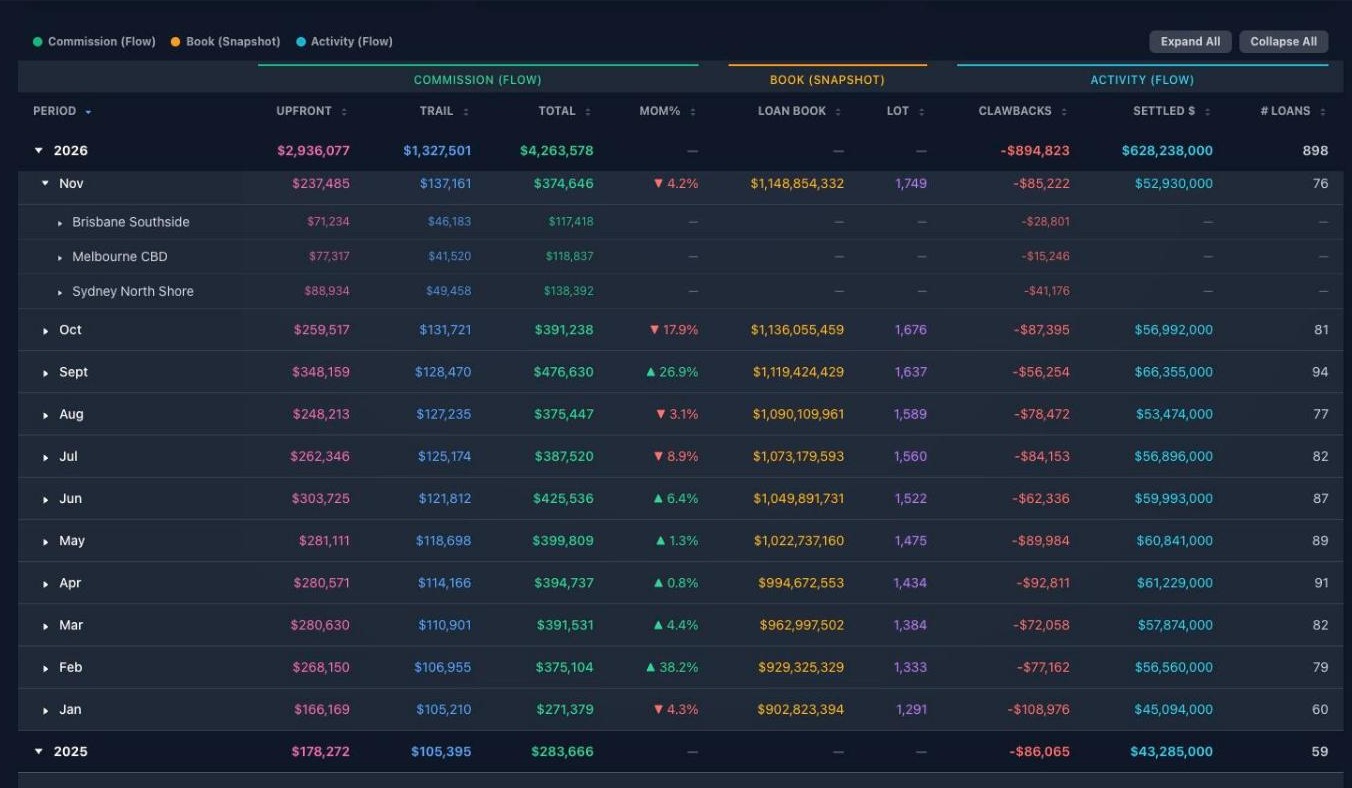
Month by month, with each office under it. Demo workspace with sample data.
Where VALUTTEN fits
VALUTTEN is built for Australian mortgage broking businesses. It reads the commission statements your aggregator sends to your connected Google Workspace or Microsoft 365 mailbox and places each payment on its loan. It does not connect to your aggregator directly. Onboarding is white-glove: three or more years of your history are loaded and reconciled, so the first time you log in, your dashboard, reports and pages already show your own data. Primary data is stored in Australia (Google Cloud, Sydney).
Plans and prices are on the pricing page.
See how VALUTTEN works.
From mailbox connection to loan-level reporting, step by step.
More guides
- Mortgage aggregators in Australia compared
- How to reconcile aggregator RCTI commission statements
- How a mortgage broker trail book is valued in Australia
- How to find clients who have refinanced away
Sources
- This guide draws on the VALUTTEN product and on general industry practice. It cites no third-party figures.
This guide is general information. It is not financial, tax or legal advice. Commission terms differ between lenders and aggregators, so check your own agreements.