Step 1
Connect your mailbox.
VALUTTEN connects to the Google Workspace or Microsoft 365 mailbox where your aggregator sends commission statements. That is the only thing you set up.
Your mailboxRead-only connection
Aggregator commissions.xlsxCommission statement, November run 1
Aggregator commissions.pdfRCTI and remittance advice
Acquired book, prior aggregator.pdfTrail statement, payee summary
Everything else in your inboxignoredOnly commission emails are read
Illustration.
Step 2
Statements are read as they arrive.
Spreadsheets and PDFs are picked up automatically, including statements from books you have acquired. Nobody uploads a file or keys in a number.
Statements receivedNo uploads, no rekeying
Commission statement .xlsxSpreadsheet from your aggregatorRead
RCTI .pdfTax invoice, every lineRead
Trail statement .pdfFrom a book you acquiredRead
Illustration.
Step 3
Every line is placed on a loan.
Each payment is matched to its loan, lender, broker and month. A loan that stops appearing is flagged, so a discharge nobody reported does not sit unnoticed.
Who To Call
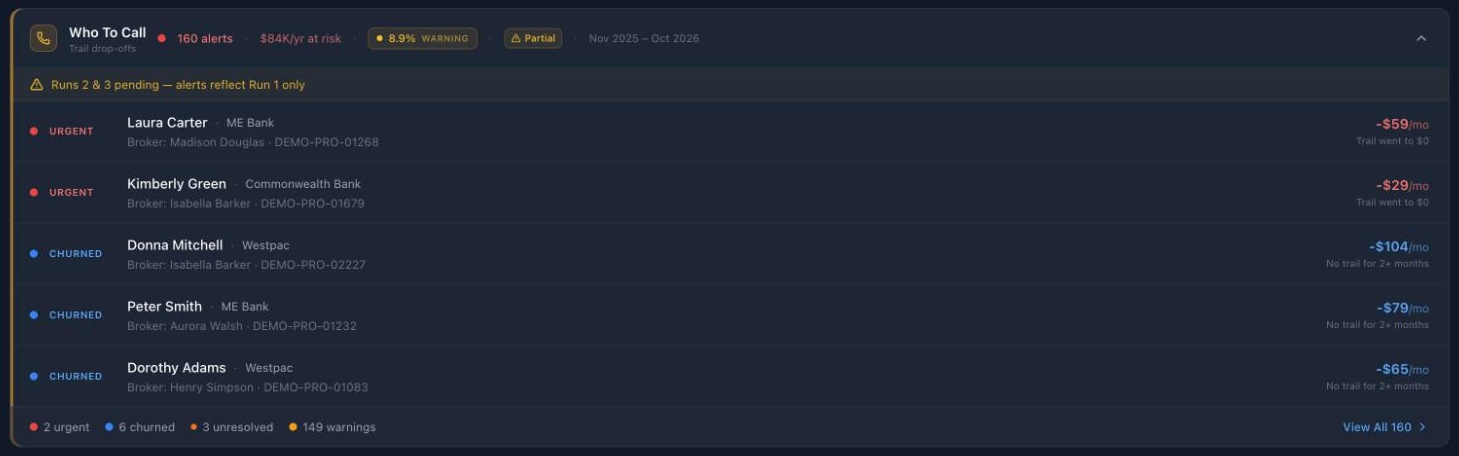
Who To Call in VALUTTEN. Demo workspace with sample data.
Step 4
You see the whole book.
Commission, trail, loan book and settlements in one view, with the loans that need a call at the top. Open any office, broker or entity when you need the detail.
VALUTTEN dashboard

The VALUTTEN dashboard. Demo workspace with sample data.
Your mailboxRead-only connection
Aggregator commissions.xlsxCommission statement, November run 1
Aggregator commissions.pdfRCTI and remittance advice
Acquired book, prior aggregator.pdfTrail statement, payee summary
Everything else in your inboxignoredOnly commission emails are read
Illustration.
Statements receivedNo uploads, no rekeying
Commission statement .xlsxSpreadsheet from your aggregatorRead
RCTI .pdfTax invoice, every lineRead
Trail statement .pdfFrom a book you acquiredRead
Illustration.
Who To Call
Who To Call in VALUTTEN. Demo workspace with sample data.
VALUTTEN dashboard
The VALUTTEN dashboard. Demo workspace with sample data.