Reconcile at the loan, not at the total. Match every statement line to a loan, compare each loan's trail with last month, check that new settlements and clawbacks are what you expect, then tie the statement total to the RCTI and the RCTI to the bank deposit.
What you are reconciling
A lender pays commission to your aggregator. The aggregator takes its share and its fees, then pays your business and sends two things: a recipient-created tax invoice (RCTI), which is the tax invoice your aggregator issues on your behalf, and a commission statement listing the loans behind it.
The RCTI gives you a total. The statement gives you the lines. Checking that the total reached your bank account proves you were paid something. Only the lines can show you were paid the right amount on every loan.
Before you start
- The RCTI for the commission run.
- The line-level statement for the same run, as a spreadsheet if your aggregator offers one.
- Last month's statement, reconciled.
- Your loan list, with lender account number, client, broker, settlement date and loan amount.
- Your aggregator agreement, for your split and the fees that can be deducted.
The seven steps
- Split the statement by payment type. Separate upfront, trail, clawbacks, and aggregator fees or other deductions. Some aggregators mix upfront and trail in one list.
- Match every line to a loan. Use the lender account number. Client names are spelled differently from lender to lender and change when loans are restructured.
- Compare trail with last month, loan by loan. List every loan whose trail fell, went to zero, or is missing from this run. This is the step a total can never do for you.
- Check new settlements. Every loan that settled should show an upfront payment in the run you expect. List the ones that have not appeared.
- Check clawbacks. For each clawback, confirm the loan, the settlement date and the lender's clawback terms. Lenders set their own periods. Macquarie, for example, claws back 100% if a loan is discharged within 12 months of settlement and 50% from 12 to 18 months.
- Tie out the totals. The statement lines should add up to the RCTI. The RCTI, less anything your aggregator nets off, should equal the bank deposit.
- Raise queries while they are fresh. Send your aggregator the lender, the account number, the month and the amount you expected. A query raised in the same month is far easier to resolve than one raised at year end.
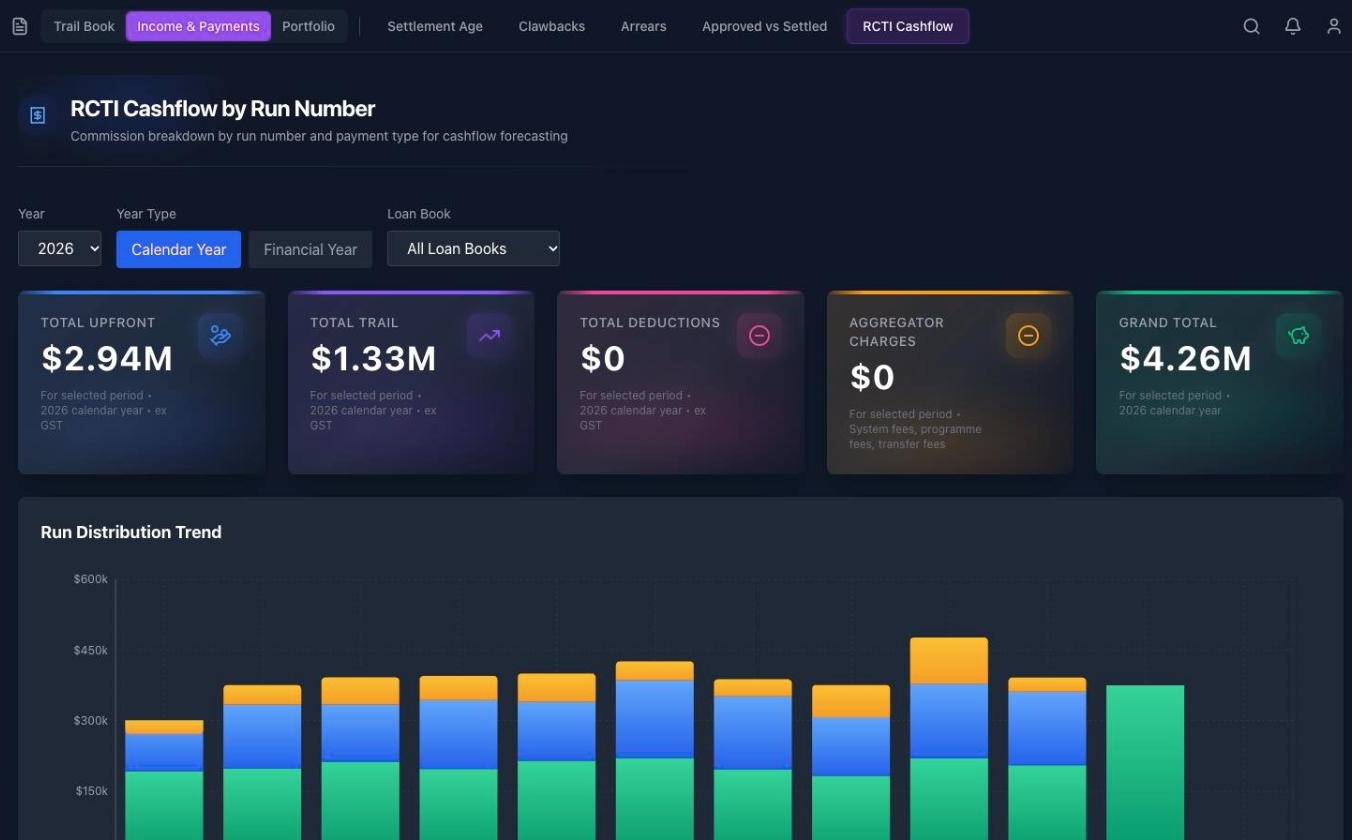
Commission runs broken out by payment type. Demo workspace with sample data.
Why lines do not match
| What you see | Common causes | What to do |
|---|---|---|
| Trail is zero or the loan is missing | Loan discharged or refinanced, balance below the lender's minimum, loan in arrears, or a lender payment that arrived late | Check next month's run, then call the client |
| Trail fell sharply | A large repayment, a partial discharge, or more money sitting in offset | Worth a client call. See the guide on finding clients who have refinanced |
| No upfront on a settled loan | Timing of the lender's commission run, or the loan was not linked to your business | Query with the account number and settlement date |
| Upfront lower than expected | Many lenders pay on the balance net of offset and redraw, not the approved limit | Check the lender's commission terms |
| A deduction you do not recognise | Aggregator fees, software charges, or a clawback netted off | Match it to your aggregator agreement |
Lender rules differ. Macquarie states that trail may stop when a loan is discharged, when the principal falls below $10,000, or when the loan is more than 60 days in arrears. Other lenders set their own thresholds.
How often to do it
Every commission run. Trail that stops is a client who may be leaving, and that signal loses value with each week it goes unread. A business that reconciles once a quarter finds out three months after the client has gone.
How VALUTTEN does it
VALUTTEN reads the commission statements your aggregator sends to your connected Google Workspace or Microsoft 365 mailbox, as spreadsheets and PDFs, and places each payment on its loan. It does not connect to your aggregator directly. Upfront, trail, clawbacks and settlements are then shown by month, office and commission run, and loans whose trail has dropped or stopped are flagged.
See every commission run, accounted for.
The commission reconciliation page shows the reports VALUTTEN builds from your statements.
More guides
- Mortgage aggregators in Australia compared
- How a mortgage broker trail book is valued in Australia
- How to find clients who have refinanced away
- Spreadsheets or software for commission reconciliation
Sources
- Macquarie Broker Help Centre, "Understanding broker commission payments", read 26 November 2026. One lender's policy, used as an example.
This guide is general information. It is not financial, tax or legal advice. Commission terms differ between lenders and aggregators, so check your own agreements.